
Close Compliances of the SQL Kind
Improving multi-account, multi-region security posture through AWS Config advanced queries

In this post of Cloudy With a Chance of Serverless, we are not alone in the universe, as we search for unidentified configuration objects of our AWS Resources, through AWS Config!
It’s 3 AM Somewhere
“I know this sounds crazy, but ever since yesterday on the road, I've been seeing this shape. Shaving cream, pillows...Dammit! I know this. I know what this is! This means something. This is important.”
- Ron Neary, Close Encounters of the Third Kind
Welcome to another blog post! Quick poll: Do you suddenly wake up late at night, wondering if your AWS environment is secure? What if there are unintentional, Public facing Resources? Is CloudTrail enabled? Are Lambda Functions all running inside a VPC? Is encryption enabled on all S3 Buckets? How would you check this in all Regions? Ahhh!
As you lie there, languishing over these questions, you know that there has to be a better way of not just monitoring these types of configurations for compliance, but also being able to get an answer to these types of reasonable requests in AWS.
Well, you’re in luck my friends! Today, we’ll take your knowledge of AWS Config one step further by enabling the flow of recorded Organizational data, into a central Account and Region. Say, a SecOps Account.
⚡Pro Tip: This works for both GovCloud and Commercial alike!
The People Person’s Paper People
“Technology is nothing. What’s important is that you have a faith in people, that they’re basically good and smart, and if you give them tools, they’ll do wonderful things with them.”
- Steve Jobs
Aggregation is an interesting feature-addition to AWS Config: It solves the need to gather multi-account, multi-region compliance data into a single view, and additionally, it allows the ability to query this data using simple SQL statements. And trust me, you don’t need to be a DBA for this, it’s incredibly easy!
Initial setup is pretty straight forward:
Prerequisite: Ensure AWS Config is Enabled and Recording in all Accounts and Regions. Record it all. If needed, use a CloudFormation StackSet to enable this Service from a Delegated Account. You never know when you will need to hunt down something from the past!
Enable the AWS Config Service at the Organization level and register a Delegated Administrator Account to aggregate to, such as DevOps or SecOps.
Head to the AWS Config Service in this Account and setup an Aggregator for the Organization, for all Regions. Feel free to use the Console, Terraform, or CloudFormation to do this; it’s easy enough to redo either way. Note that the AWS Config Service must be enabled in each Region where you are gathering data from - This part should indeed be done with infra-as-code.
It takes a bit of time for the Config data to start flowing into your central Account-Region, from all other Accounts and Regions.
Now that we have the base setup completed. Let’s look at a few use-cases this opens up for us!
The Engineering Corner
Your Manager was asked by the CISO to determine the count of all Stopped EC2 Instances, the Instance Types, and which VPC they belong to, for all Commercial and GovCloud AWS Accounts. Get this data in a few minutes!Solution: Okay, deep breath! We don’t need to write a script which gets this data by using EC2 APIs. Instead, turn to AWS Config in the central, DevOps or SecOps Commercial Account, select Advanced Queries and the Aggregator which you created earlier. We’ll just need to run a simple SQL query first to determine what kind of Configuration data is available, then we’ll refine it further:
SELECT
  configuration
WHERE
  resourceType = 'AWS::EC2::Instance'
The results will have a “View configuration” link, click it to see the configuration key-value pairs we have access to. Once you have found the necessary types, we can just as easily add them in. Let’s refine our query further:
SELECT
  configuration.instanceType,
  configuration.vpcId,
  awsRegion,
  accountId
WHERE
  resourceType = 'AWS::EC2::Instance'
  AND configuration.state.name = 'stopped'
Results:
t2.micro  vpc-123abcd1  us-west-2  123456789012
c4.xlarge vpc-123abcd1  us-east-1  123456789012
m4.large  vpc-456efgh2  us-east-1  210987654321 ...
Click the Gear Icon next to the results, select 50 Results (Max), then browse to the last Page of the report, and click on Export As CSV. This is required because of a current limitation in the UI.
See how quick and easy that was without messing around with scripts? Pop the CSV data into an Excel Sheet, do some ordering if needed, and send it off to your boss. Repeat this procedure inside GovCloud as needed.
⚡Pro Tip: As you type your Query statements, attributes, etc., the UI will provide helpful suggestions!
The CISO has mandated that due to compliance and regulations, the current Cloud environment requires that for certain Accounts, all AWS Lambda Functions must be running inside a VPC. Your Manager requests your help in finding out which Functions are in non-compliance, so that a remediation plan can be put into place with the appropriate teams. Clock is ticking!Solution: You learned a lot from the previous dive into running Queries. Let’s give this one a shot and get an introduction to the power of Relationships! Again, we’ll start with the available data first, and then determine how we should refine our query further:
SELECT
  relationships,
  resourceName
WHERE
  resourceType = 'AWS::Lambda::Function'
The results will have a clickable link to items related to each Lambda Function to show what is connected to it. Most likely you will see an IAM Role associated with your Functions. In some cases, you may see Subnets. This is what we are after: As long as there is a Subnet associated with the Function, it can be considered to be part of a VPC. Let’s refine our search further:
SELECT
  resourceName,
  awsRegion,
  accountId
WHERE
  resourceType = 'AWS::Lambda::Function'
  AND accountId in ('123456789012', '210987654321')
  AND relationships.resourceType != 'AWS::EC2::Subnet'
Results:ETLWorker us-west-2 123456789012
S3Processor us-east-2 210987654321 ...
Let’s break the WHERE statements down a bit more:
AND accountId in (allows us to provide our own List)AND relationships.resourceType != (allows us to only filter on associations where the Subnet resourceType is missing)
From the UI, browse to the last page of results, export this data, and filter as needed. Repeat this from the central, AWS GovCloud Account and send off the reports.
Solved in under 5 minutes? I think you’re starting to feel the power coursing through your veins now! Alright, Alright, Alright!
⚡Pro Tip: Save the custom queries directly in AWS Config, as you may need them again. Document the use cases and options in your source control tool for future use.
A week has passed, and the remediation efforts are still on-going from the previous findings of non-compliant AWS Lambda Functions. Now, the CISO wants a progress report ASAP! In fact, this report should be emailed every week.Solution: Well, it’s a good thing that you are getting better at this! Grab a DevOps colleague, and let’s plan some automation to go along with the custom query we just ran. Using Boto3 (AWS SDK for Python) and Amazon SES, we can customize the results in HTML and send the report off to the CISO, and to your Manager. The architecture will look something like this:
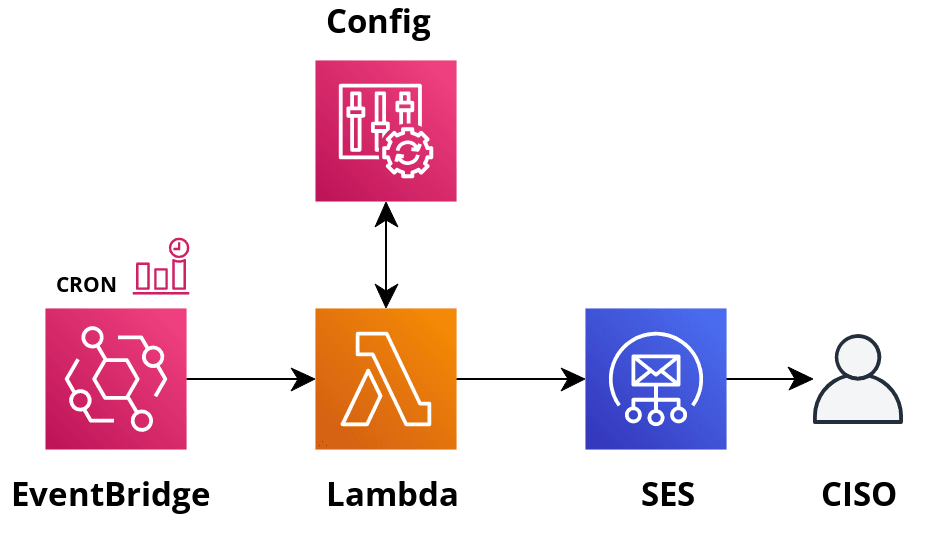
Setup Amazon SES by on-boarding email accounts, and let the recipients know that they’ll need to acknowledge an incoming invite. Setup EventBridge as a CRON to invoke the Lambda Function every week. This Lambda Function will simply call the AWS Config API, using Boto3 to run your Query with Aggregation - The built-in Paginator can be used here. Afterward, it can call SES to send an email out. SES allows templating, where you just need to provide data for variables. After testing in a sandbox or dev Account, use infra-as-code and commit this solution to source control.
⚡Pro Tip: The architecture above is simple and useful. Bonus points for turning this into an AWS Service Catalog Product, where it can be vended as a microservice, complete with its own CICD - where all the user needs to do is commit code! If you haven’t read about AWS Service Catalog, then check it out here.
Final Thoughts and Takeaways
“Win/win is number four and number five is win/win/win. The important difference here is with win/win/win, we all win. Me too.”
- Michael Scott, The Office
We started off with an unknown, and now have the power to allay our concerns by gathering the correct data to figure out how to improve our infrastructure and processes! Along the way we saw how easy it was to use simple SQL statements, without any DB background. And while we did not explore too many types of statements, the ones we did discuss form a strong base for you to experiment on your own going forward. Of course, some of these Queries can be even more useful when turned into infra-as-code and connected to a scheduler.
📟 Call for Action: Grab a couple of your colleagues in Security and enable AWS Config’s Aggregation feature today! Start jotting down the types of questions you are frequently being asked, or asking yourself, and then write the SQL directly in the AWS Config console. Be sure to save your custom Queries not just in Config, but also in your preferred documentation or source control tool. Once you have finalized your queries, invite a couple of DevOps folks, or DIY, to use Boto3 (AWS SDK for Python) in a Lambda Function to run new, or invoke existing Config Queries on a schedule, with the processed output going to a Security email distribution list via Amazon SES, using simple HTML formatting. It could simply state, for example, “No potential misconfigurations detected. Sleep tight!” For Slack users, explore the use of integration of ChatOps using AWS Chatbot.
That’s all for now - I hope you found valuable information here that piqued your interests. See you in the next post!
😆